How Twitch’s Guest Star Feature Impacts Bandwidth for Single-PC Stream Setups
How Twitch’s Guest Star Feature Impacts Bandwidth for Single-PC Stream Setups
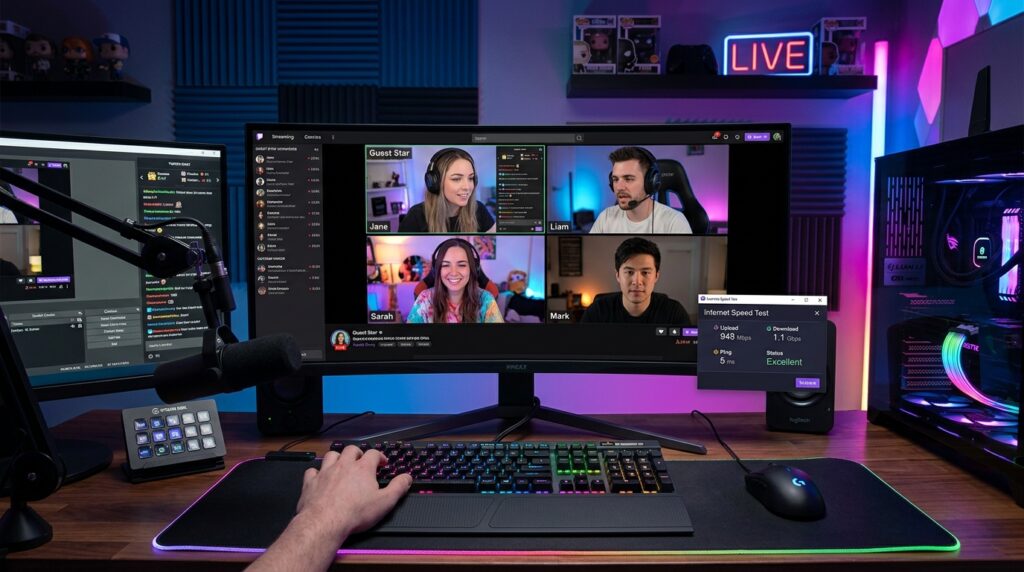
Streamers are able to include guests into their live broadcasts without having to depend on any additional software thanks to Twitch’s Guest Star feature, which adds a new dimension of involvement to the platform. At the same time as this makes cooperation easier, it also poses extra technological challenges, particularly for producers who are employing a streaming configuration that just involves a single computer. With these kinds of systems, a single system is responsible for handling gaming, encoding, broadcasting, and now even real-time video contact with visitors. This aggregation of jobs has the potential to bring about major changes in bandwidth utilisation as well as overall stream stability. Streamers who have restricted internet connections or hardware capabilities may experience missing frames, audio sync difficulties, or a decline in video quality as a result of the Guest Star function. It is crucial to have a solid understanding of how bandwidth is distributed and used throughout these sessions in order to ensure that the streaming experience remains uninterrupted. Although it is a strong feature, it must be carefully optimised in order to prevent performance bottlenecks from occurring. Before making heavy use of the system, streamers are required to examine both the upload capacity and the functioning of the system. It is feasible to incorporate Guest Star without sacrificing the quality of the stream of content if the appropriate changes are made. In order to successfully execute anything, it is essential to be aware of certain technical variables.
Gaining an Understanding of the Bandwidth Requirements for Guest Star
The addition of numerous real-time video and audio streams to a broadcast is made possible by the Guest Star feature, which results in an increase in the total bandwidth use. Each visitor brings with them more data that has to be communicated and received at the same time. Consequently, this indicates that the system must be able to manage both outgoing stream data and incoming guest feeds for single-PC configurations. The amount of bandwidth available for uploading becomes especially significant since it impacts how well the feed is distributed to viewers. It is possible that the stream may encounter buffering or quality decreases if the bandwidth availability is inadequate. A flawless reception of guest video streams is also dependent on the amount of download bandwidth available. Streamers have a better idea of whether or not their connection can handle the functionality if they have a better understanding of these criteria. For consistent performance, it is vital to allocate bandwidth in the appropriate manner. This is the very basis upon which successful streaming is built.
Influence on the Rate of Uploading and the Quality of Streaming
When using Guest Star, one of the most important elements that is influenced is the speed at which files are uploaded. To ensure that the quality of the videos is maintained, streaming services demand a constant upload pace. In the event that more guest streams are added, the available upload bandwidth is distributed across a number of different data streams. It is possible that this may result in a lower bitrate for the primary broadcast, which will then lead to a lower video resolution or compression artefacts. It is possible for streamers to experience pixelation or latency while watching high-motion scenarios. The maintenance of a reliable upload connection is very necessary in order to avoid these problems. Adjusting the parameters for the bitrate might assist achieve a balance between performance and quality. In order to optimise, it is essential to have a solid understanding of the link between upload speed and stream quality.
Single-PC Setups: The Load on the CPU and the Network
The system must be able to manage encoding, rendering, and network processing all at the same time when installed on a single personal computer. As a result of real-time video processing and communication chores, the inclusion of Guest Star results in an increase in the amount of CPU utilisation. When playing games that are particularly demanding, this might put a burden on the system’s resources. A high level of CPU utilisation may result in missed frames or a delayed response from the input. As the system simultaneously handles many data streams, the burden on the network likewise grows. For the purpose of identifying bottlenecks, monitoring the performance of the system is vital. There may be a need for streamers to modify their encoding settings or minimise the number of background processes. When it comes to sustaining performance, effective resource management is very necessary. A smoother experience may be achieved by balancing the strain on the CPU and the network.
Improving the Efficiency of Managing Multiple Video Feeds
Being able to manage many video streams demands careful setup in order to prevent the system from being overwhelmed. The bandwidth and processing power required for each guest stream are equally used. Streamers need to restrict the number of active visitors in accordance with the capabilities of their various systems. It is possible to save resources by lowering the resolution of the guest video. Prioritizing the main stream over guest feeds ensures that the broadcast remains stable. Enhanced overall performance may be achieved via the effective handling of video streams. A scene architecture that reduces the amount of processing that is required may also be used by streamers. Modifications to the strategic plan assist to preserve quality. In order to achieve stability, complexity management is needed.
Setting the Bitrate and Resolution to Their Full Potential
Adjusting bitrate and resolution settings is one of the most effective ways to manage bandwidth usage. The quantity of data that has to be delivered may be decreased by lowering the stream resolution. This can help maintain stability when using Guest Star. Bitrate should be set according to available upload speed to avoid congestion. Streamers may need to experiment with different settings to find the optimal balance. Adaptive bitrate streaming can also improve performance under varying network conditions. Proper configuration ensures consistent quality. Optimization is an ongoing process that requires testing. Fine-tuning settings is essential for success.
Network Stability and Latency Considerations
Network stability plays a crucial role in the performance of Guest Star sessions. High latency or unstable connections can disrupt communication between the host and guests. This may result in audio delays or video desynchronization. Ensuring a stable and low-latency connection is important for real-time interaction. Wired connections are generally more reliable than wireless ones. Streamers should also minimize network congestion by limiting other internet usage during streams. Monitoring network performance helps identify issues early. Stability is just as important as speed. Reliable connections support better streaming quality.
Practical Workarounds for Limited Bandwidth
Streamers with limited bandwidth can still use Guest Star by implementing practical workarounds. Reducing the number of guests and lowering their video quality can significantly decrease bandwidth usage. Using audio-only participation for some guests is another effective option. Scheduling guest appearances strategically can also help manage resource usage. Streamers can prioritize key moments for guest interaction rather than maintaining it throughout the entire stream. These adjustments allow for flexibility without overloading the system. Creative solutions help maintain performance. Adapting to limitations is part of effective streaming.
Balancing Interactivity and Performance
The Guest Star feature enhances interactivity but requires careful balance to maintain performance. Streamers must decide how much interactivity they can support without compromising quality. Prioritizing the viewer experience is essential for long-term success. High-quality streams with occasional guest interactions may be more effective than constant but unstable collaboration. Understanding system limits helps make informed decisions. Streamers should test configurations before going live to ensure reliability. Balancing interactivity and performance leads to better outcomes. Strategic use of features ensures a professional streaming experience.